What Remote IT Support Benefits Does to Modern Business Operations


Efficiently managing IT support tickets directly impacts your team’s productivity and, crucially, your customers’ trust. Slow or mismanaged responses actively frustrate clients and waste valuable organizational hours.
The financial impact is significant: According to Qualtrics XM Institute, organizations worldwide are risking $3.7 trillion due to poor customer service.
Kevin White, CEO of TRINUS, notes that, “In today’s IT environment, fast and accurate ticket management is essential to maintain both operational efficiency and client confidence.”
This blog will guide you through every stage of how to handle IT support tickets, from effectively organizing and categorizing, to intelligently prioritizing, diligently tracking, reducing errors, and using actionable analytics to continuously improve your workflow.
Implementing these strategies enables you to streamline your operations, significantly reduce the volume of unnecessary tickets, and reliably deliver faster, more effective responses.
Stop Losing Hours on Unnecessary IT Tickets!Implement smarter ticket handling and watch your team resolve issues faster and smarter. |
How to Categorize Support Tickets
Proper organization is the fundamental foundation of truly efficient IT support. Without a clear structure, incoming tickets can easily be lost, unintentionally duplicated, or significantly delayed, leading to intense client frustration. You must ensure that every single ticket is clearly recorded, accurately categorized, and immediately visible to your entire support team.
The goal is to ensure your team knows precisely what the issue is, who should handle it, and how urgent the task is:
- Tag by Issue Type: Use clear tags and labels to identify the nature of the problem, such as software bugs, hardware issues, login problems, or password resets.
- Divide by Department: Segment tickets based on the required expertise, dividing them into categories like networking, desktop support, or cybersecurity.
- Assign Urgency: Clearly mark each ticket with an urgency level—High, Medium, or Low, guaranteeing that the most critical problems are addressed instantly.
According to CloudSecureTech, ticket workflow automation alone can accelerate resolutions by 30%. Modern ticketing systems leverage automation tools for categorization. AI-powered systems can reliably recognize keywords within the ticket description, instantly tag the issue, and route it to the appropriate, skilled technician.
Automation reduces the potential for human error, saves valuable time, and ensures that absolutely no ticket goes unnoticed or misdirected. This organized foundation directly sets the stage for proper prioritization and fast, effective resolution.
How to Prioritize and Assign Support Tickets
Once tickets are fully organized, you need a clear, consistent method to prioritize support tickets based on true urgency and actual business impact. Not all tickets are equally critical, and addressing less-important issues first can inadvertently create much bigger operational problems.
Priority must be assigned using specific business metrics:
- Severity and Impact: Prioritize based on the issue’s severity, the specific customer profile involved, and the potential operational impact. A server outage affecting multiple essential employees should always be designated High Priority.
- SLA Thresholds: Clearly establishing Service Level Agreement (SLA) thresholds ensures your team understands the expected maximum response and resolution times for every single category and priority level.
You must assign tickets to technicians who possess the exact skills needed to resolve the issue efficiently. Role-based assignment actively prevents frustrating delays caused by trial-and-error attempts or repeated, unnecessary handoffs between team members.
You should ensure that your entire support team has clear visibility into all open tickets to maintain shared accountability. Efficient assignment significantly reduces overall resolution times and consistently improves end-user satisfaction.
How to Track and Monitor Support Tickets
Tracking support tickets in real time provides both operational clarity and essential accountability. Without diligent tracking, it is impossible to know accurately which tickets are currently pending, delayed, or fully resolved, and critical patterns in recurring issues will inevitably go unnoticed.
You must measure these key metrics to drive improvement:
- Resolution Speed: Track metrics such as the average ticket volume, the overall resolution time, the current backlog size, and SLA compliance rates.
- Customer Feedback: Monitor Customer Satisfaction Scores (CSAT) directly tied to ticket resolution.
Tracking these data points allows your team to identify bottlenecks and highlight immediate areas for improvement.
Dashboards provide a crucial visual snapshot of your team’s workload and overall progress. Automated reporting alerts you instantly to overdue tickets and SLA breaches, minimizing the need for manual oversight. These timely insights ensure tickets are resolved faster and allow management to plan resource capacity more effectively. Proper tracking is the bedrock for efficient responses.
How to Answer Support Ticket Requests Efficiently
43% of customers lose trust after experiencing weak support. Prompt, consistently high-quality responses are essential for IT support success. Customers always expect clarity and speed when interacting with your team.
Knowing how to answer support tickets properly ensures a positive service experience while quickly resolving the core issue.
Achieve speed and consistency through smart tools:
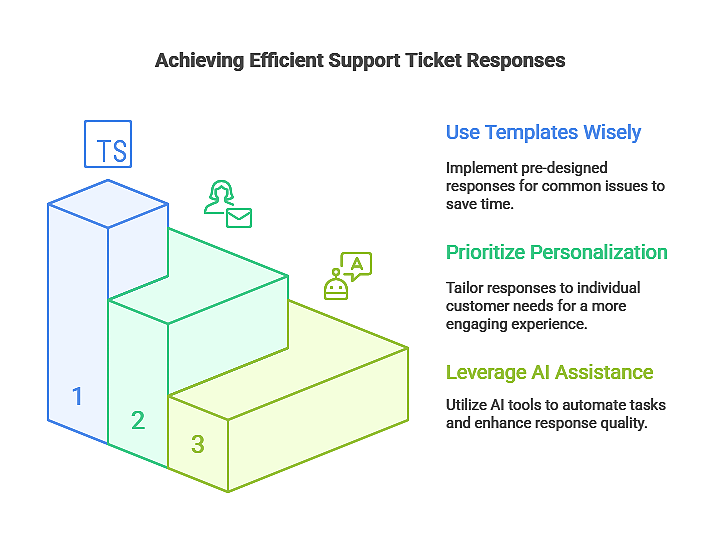
- Use Templates Wisely: Prepare response templates for common, repeatable issues like password resets, login errors, or specific software updates. Templates save significant time while keeping communication professional and consistent.
- Prioritize Personalization: Always personalize the response by directly referencing the customer’s specific issue. This simple step shows clear attentiveness and upholds a high standard of professionalism.
- Leverage AI Assistance: Automated ticket routing assigns queries to the correct team based on keywords or technician skill sets. AI tools can effectively recommend solutions or even draft initial response suggestions for technician review.
How to Reduce Support Ticket Volume and Invalid Technical Support Tickets
A constantly high volume of simple or invalid ticket submissions can quickly overwhelm even the most capable support teams. Learning how to reduce support tickets and how to reduce invalid technical support tickets is critical for maintaining long-term operational efficiency.
Reduce unnecessary demand with smart resource management:
- Self-Service Knowledge Bases: A comprehensive knowledge base empowers customers to find answers independently, significantly reducing the number of repeat tickets. FAQs, troubleshooting guides, and video tutorials allow users to resolve common issues on their own.
- Structured Intake Forms: Implement structured intake forms that require clear, verified information from the start. This prevents incomplete submissions and minimizes the unnecessary back-and-forth needed to gather crucial details.
- Recurring Issue Management: Actively monitor patterns in your ticket data to clearly identify recurring problems. Address the root cause problem, update all relevant knowledge base articles, and communicate the solution proactively to the user base.
| More articles you might like: |
What are Some of the Most Common Trouble Tickets in IT Support
Knowing what some of the most common trouble tickets IT support teams routinely face helps you plan capacity and respond effectively. Understanding these prevalent issues can significantly reduce your average response time and improve the accuracy of the resolution provided.
Proactive planning focuses on these frequent ticket types:
- Access Issues: Primarily involving login errors and password reset requests.
- Application Errors: Relating to software bugs, application failures, or unexpected functionality problems.
- Connectivity Problems: Dealing with network outages, Wi-Fi connectivity failures, or VPN access issues.
- Hardware Malfunctions: Issues concerning non-functioning peripherals, desktop hardware errors, or device failures.
You can proactively reduce repeat tickets by documenting solutions thoroughly in a robust knowledge base and providing helpful, proactive tips to users. Use follow-ups to ensure issues are completely and permanently resolved.
Analytics and Continuous Improvement
Analyzing your ticket data is the most effective way to continuously refine and optimize your IT support processes. Metrics can clearly identify existing bottlenecks, highlight persistently recurring issues, and provide objective data on team performance. Businesses with strong CX deliver revenue growth at over 2X the pace of the rest of the market.
Establishing a solid feedback structure is vital:
1. Customer Feedback Loops
Systematically collect direct feedback via quick post-resolution surveys or forms. Use this data to understand satisfaction levels and identify specific areas for improvement, which helps refine workflows and optimize ticket categorization.
2. Iterative Process Enhancement
Analyze trends and performance metrics over extended periods to strategically adjust staffing levels, improve SLA compliance rates, and consistently reduce average resolution times.
This commitment to continuous improvement ensures your IT support team becomes faster, more accurate, and more reliable for your clients, transforming support into a genuine asset.
Ticket Type Reference Table
Proper ticket management relies heavily on understanding categories and practical examples not fully addressed in previous steps.
This table comprehensively outlines common ticket types, gives examples of issues, and details the best practices for handling each. This resource helps support teams quickly identify the right approach for different situations.
| Ticket Type | Example Issue | Best Practice Handling |
|---|---|---|
| Login / Access | Password reset or login failure | Auto-routing to access support, strict verification of credentials |
| Software / App | Application crashes or specific errors | Provide detailed response templates, track recurring application issues |
| Network / Connectivity | Slow internet or complete network outage | Immediately escalate high-priority alerts, monitor SLA compliance closely |
| Hardware | Printer or specific PC component malfunction | Assign directly to a technician with proven hardware expertise |
| Security | Virus alert or unauthorized access notification | Use automated alerts, follow strict established security protocols |
Outsource Your IT Support to TRINUS
Efficient IT support is a powerful asset, built on a foundation of rigorous organization, intelligent prioritization, diligent tracking, fast and clear responses, actively reducing unnecessary tickets, and a commitment to continuous improvement.
Trinus is a leading provider of expert IT support services with more than 90% being answered by a support representative in less than a minute. Our proactive approach ensures your IT operations remain predictable, fast, and completely secure.
| Reliable IT Support Services Near You |
| Edmonton |
Contact us today to schedule a consultation and take the necessary steps to significantly improve your ticket handling process and overall operational efficiency.